At this stage, AgenticMediaLab has evolved into:
- ingestion systems
- async queues
- LangGraph orchestration
- embeddings
- trend ranking engines
- publishing agents
- observability dashboards
The platform is no longer:
- a collection of Python scripts.
It is becoming:
- operational AI infrastructure.
And operational systems eventually require:
deployment.
Because AI systems that only run locally are:
- experiments.
AI systems that run reliably across environments become:
- infrastructure.
In this article, we will deploy the AgenticMediaLab stack using Docker.
We will containerize:
- AI workflows
- Redis
- PostgreSQL
- Celery workers
- Prometheus
- Grafana
and prepare the platform for:
- scalable autonomous execution.
This is where the project begins transitioning from:
- local development
into:
- deployable autonomous AI infrastructure.
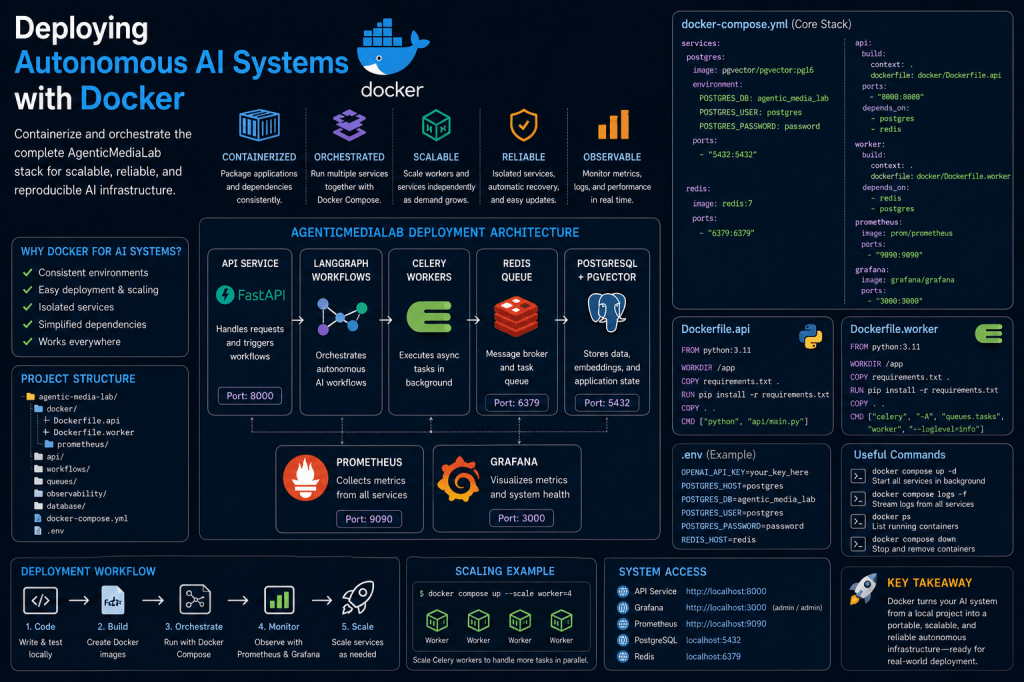
Why Docker Matters for AI Systems
Modern AI systems involve many moving parts.
Examples:
- databases
- queues
- APIs
- orchestration engines
- monitoring systems
- workers
- schedulers
Without containers:
- environment inconsistencies appear quickly
- deployments become fragile
- dependencies conflict
- scaling becomes difficult
Docker solves these operational problems.
What Docker Actually Provides
Docker creates:
- isolated execution environments.
This means:
- the application
- dependencies
- runtime
- libraries
- configurations
travel together as one deployable unit.
This is critical for:
- AI infrastructure reliability.
The Shift From Scripts to Services
Before Docker:
Run Python File
After Docker:
Deploy Operational Service
This is a major engineering transition.
High-Level Deployment Architecture
The deployed stack now looks like this:
FastAPI ↓LangGraph Workflows ↓Celery Workers ↓Redis Queue ↓PostgreSQL + pgvector ↓Prometheus + Grafana
This resembles:
- real production AI infrastructure.
Repository Structure
The deployment layer now becomes:
agentic-media-lab/│├── docker-compose.yml├── .env│├── docker/│ ├── Dockerfile.api│ ├── Dockerfile.worker│ └── prometheus/│├── api/├── workflows/├── queues/├── observability/└── database/
This creates:
- deployment organization.
Why docker-compose Matters
AI systems usually require:
- multiple services running simultaneously.
Docker Compose orchestrates:
- networking
- startup order
- containers
- dependencies
from one configuration file.
The Core docker-compose.yml
Create:
docker-compose.yml
Example:
services: postgres: image: pgvector/pgvector:pg16 environment: POSTGRES_DB: agentic_media_lab POSTGRES_USER: postgres POSTGRES_PASSWORD: password ports: - "5432:5432" redis: image: redis:7 ports: - "6379:6379" prometheus: image: prom/prometheus ports: - "9090:9090" grafana: image: grafana/grafana ports: - "3000:3000"
This becomes:
- the infrastructure entry point.
Starting the Entire Stack
Run:
docker compose up
Docker now:
- downloads images
- creates containers
- configures networking
- starts services
The AI infrastructure stack becomes operational.
What Happens Internally
Docker Compose automatically:
- creates a virtual network
- connects containers together
- exposes ports
- manages service dependencies
This is why container orchestration is so powerful.
Containerizing the Python API
Create:
docker/Dockerfile.api
Example:
FROM python:3.11WORKDIR /appCOPY requirements.txt .RUN pip install -r requirements.txtCOPY . .CMD ["python", "api/main.py"]
This creates:
- a deployable AI application container.
Why Dockerfiles Matter
Dockerfiles define:
- reproducible environments.
This prevents:
- “works on my machine” problems.
Every deployment becomes:
- predictable.
Creating the Celery Worker Container
Create:
docker/Dockerfile.worker
Example:
FROM python:3.11WORKDIR /appCOPY requirements.txt .RUN pip install -r requirements.txtCOPY . .CMD ["celery", "-A", "queues.tasks", "worker", "--loglevel=info"]
This container handles:
- async AI workflows.
Why Separate Workers Matter
Separating:
- API services
AND - worker services
improves:
- scalability
- reliability
- workload distribution
Operational AI systems increasingly rely on:
- distributed workers.
Adding Build Instructions
Update:
api: build: context: . dockerfile: docker/Dockerfile.api
And:
worker: build: context: . dockerfile: docker/Dockerfile.worker
Docker can now:
- build custom AI containers.
Environment Variables
Create:
.env
Example:
OPENAI_API_KEY=your_key_herePOSTGRES_HOST=postgresREDIS_HOST=redis
Environment variables improve:
- security
- portability
- deployment flexibility
Why .env Files Matter
Hardcoding secrets inside code is dangerous.
Environment variables allow:
- safer deployments
- environment switching
- operational flexibility
Production systems rely heavily on:
- environment configuration.
Running Containers in Background
For operational deployment:
docker compose up -d
The -d flag means:
- detached mode.
The stack continues running:
- in background.
Viewing Running Containers
Check active services:
docker ps
Example output:
postgresredisgrafanaprometheusworkerapi
The infrastructure is now:
- operationally deployed.
Viewing Logs
View logs:
docker compose logs
Live streaming logs:
docker compose logs -f
Logs become essential for:
- observability
- debugging
- operational monitoring
Why Deployment Changes Everything
Deployment introduces entirely new engineering concerns:
- uptime
- networking
- failures
- scaling
- observability
- orchestration
- resilience
This is where AI engineering overlaps heavily with:
- DevOps
- platform engineering
- distributed systems
Example Future Architecture
The deployed stack will eventually evolve into:
Ingress Layer ↓FastAPI Services ↓LangGraph Workflows ↓Celery Workers ↓Redis Queues ↓PostgreSQL + pgvector ↓Prometheus + Grafana
This increasingly resembles:
- production AI infrastructure.
Scaling Containers
One major advantage of Docker:
Services scale independently.
Example:
docker compose up --scale worker=4
Now:
- four Celery workers
process tasks simultaneously.
This dramatically improves:
- throughput
- parallelism
- operational capacity
Why Containerization Matters for AI
AI workloads are:
- compute-intensive
- asynchronous
- distributed
- operationally complex
Containers help standardize:
- execution environments
- infrastructure layers
- deployment workflows
Without containerization:
- scaling becomes chaotic.
Common Beginner Mistake
Many developers initially run:
- everything locally
- manually
- from terminals
But production systems increasingly require:
- orchestration
- containerization
- reproducibility
- automated deployment
Docker becomes foundational infrastructure.
Future Improvements
The deployment layer will eventually support:
- Kubernetes
- container orchestration
- distributed agents
- autoscaling
- rolling deployments
- CI/CD pipelines
- cloud deployment
This moves toward:
- production-grade autonomous AI infrastructure.
Why This Is a Major Milestone
This article marks another major architectural shift.
The platform is no longer simply:
- a development environment.
It is becoming:
- deployable operational infrastructure.
This changes how the system is engineered entirely.
The Bigger Transition
The platform has gradually evolved through multiple phases:
Scripts ↓Workflows ↓Queues ↓Embeddings ↓Trend Intelligence ↓Publishing Agents ↓Observability ↓Deployment Infrastructure
This is the lifecycle of modern autonomous AI systems.
What Comes Next
The next infrastructure layers will introduce:
- cloud deployment
- Kubernetes orchestration
- distributed AI agents
- semantic memory systems
- self-healing workflows
- autonomous scaling systems
The platform is gradually evolving into:
- a fully operational autonomous AI infrastructure platform.
Final Thoughts
Deploying AI systems with Docker is one of the most important transitions in modern AI engineering.
It transforms:
- local experiments
into:
- operational infrastructure.
By combining:
- Docker
- PostgreSQL
- Redis
- Celery
- LangGraph
- Prometheus
- Grafana
AgenticMediaLab now gains:
- reproducible deployment
- scalable infrastructure
- operational portability
- autonomous execution environments
The platform is evolving from:
- development workflows
into:
- deployable autonomous AI systems.
 Agentic Media Lab