While building the first RSS ingestion pipeline for AgenticMediaLab, I encountered a surprisingly common Python issue:
No module named 'feedparser'
At first, the solution seemed obvious.
I reinstalled the package:
pip install feedparser
The installation completed successfully.
No errors.
Everything looked correct.
But when running the Python script again, the exact same error still appeared:
ModuleNotFoundError: No module named 'feedparser'
Interestingly, after completely shutting down the laptop and restarting the machine, the issue disappeared and the module loaded correctly.
This experience highlights an important reality of software development:
Not every problem is caused by bad code.
Sometimes the environment itself becomes part of the debugging process.

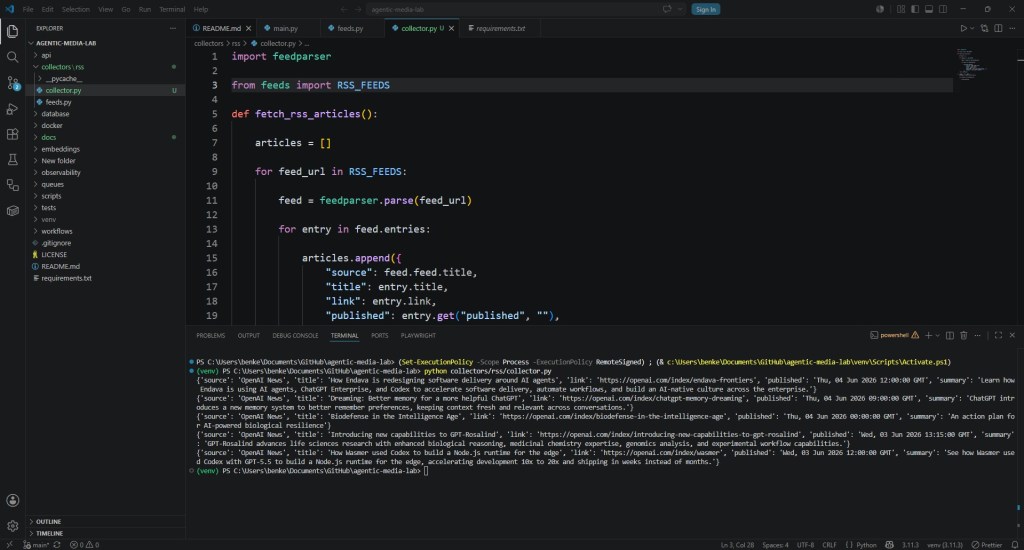
The Frustrating Part of Environment Problems
Errors like this can be confusing because:
- the package appears installed
- pip reports success
- no syntax errors exist
- the code itself is correct
Yet Python still cannot locate the module.
This often leads developers into:
- reinstall loops
- version confusion
- unnecessary code rewrites
- broken virtual environments
The real issue is frequently environmental rather than logical.
What Probably Happened
Although the exact internal cause can vary, issues like this are often related to:
1. Environment State Problems
The terminal, IDE, or Python interpreter may still reference:
- an old environment
- outdated paths
- stale interpreter sessions
2. Virtual Environment Synchronization
Sometimes:
- the package installs into one environment
- but the script runs inside another
Example:
- global Python vs virtual environment
- VS Code interpreter mismatch
- terminal mismatch
3. Cached Python Processes
Background processes may continue using:
- outdated package paths
- stale imports
- old interpreter references
A full system restart clears:
- cached sessions
- interpreter state
- locked environment references
Why Restarting Sometimes Actually Works
Developers often joke about:
“turning it off and on again.”
But in software engineering, restarting can legitimately solve:
- path synchronization issues
- environment reload problems
- IDE interpreter mismatches
- locked processes
- stale shell sessions
Especially in Python development, environments can occasionally become inconsistent after:
- package installations
- environment switching
- IDE updates
- interrupted installations
A Good Reminder About Debugging
One important lesson from this issue:
Do not immediately assume:
- your code is broken
- the package failed
- the framework is unstable
Sometimes the runtime environment itself is the problem.
Modern development environments involve:
- interpreters
- package managers
- virtual environments
- IDE integrations
- shell sessions
- operating system paths
There are many layers where inconsistencies can appear.
Useful Things to Check Before Panicking
When encountering a module import issue, it helps to verify:
Check Installed Packages
pip list
Check Exact Python Interpreter
which python
Windows:
where python
Check Installed Package Location
pip show feedparser
Verify Virtual Environment
Example:
source venv/bin/activate
Windows:
venv\Scripts\activate
Verify VS Code Interpreter
In VS Code:
- open Command Palette
- select:
“Python: Select Interpreter”
Sometimes VS Code silently points to the wrong environment.
Why These Problems Are Part of Learning
Experiences like this are frustrating in the moment.
But they are also part of becoming a stronger developer.
Software engineering is not only about:
- writing logic
- building features
It is also about understanding:
- environments
- tooling
- infrastructure
- dependency management
- operational behavior
These “small” debugging experiences gradually build engineering intuition.
Development Is More Than Code
Many beginner tutorials make programming look linear:
- install package
- write code
- run project
Real development is messier.
Developers constantly encounter:
- environment conflicts
- dependency issues
- version mismatches
- operating system quirks
- broken installations
Learning how to diagnose these problems is part of professional software development.
A Small Problem That Teaches Bigger Lessons
This issue may seem minor.
But it reinforces important habits:
- verify environments carefully
- isolate dependencies
- use virtual environments consistently
- restart systems when necessary
- think beyond the code itself
Operational awareness becomes increasingly important as projects grow more complex.
Final Thoughts
The “No module named ‘feedparser’” error turned out not to be a coding problem at all.
After reinstalling the package and fully restarting the laptop, everything worked correctly.
Sometimes software development is not about:
- fixing algorithms
but:
- understanding environments
- diagnosing tooling issues
- recognizing infrastructure behavior
And those experiences are just as valuable as writing the code itself.
Every debugging session teaches something.
Even the strange ones.
👉 You can experiment with a practical AI News System implementation of this concept in the official GitHub repository for the AgenticMediaLab: https://github.com/BenardoKemp/agentic-media-lab
 Agentic Media Lab