At this point, the AgenticMediaLab infrastructure is beginning to take shape.
We now have:
- RSS ingestion
- PostgreSQL persistence
- Redis queues
- Celery workers
- async execution
The next major layer is orchestration.
Because once AI systems evolve beyond:
- isolated prompts
and into:
- multi-step workflows
- autonomous execution
- distributed pipelines
you need a way to coordinate:
- state
- decisions
- retries
- execution paths
- workflow memory
This is where LangGraph becomes incredibly powerful.
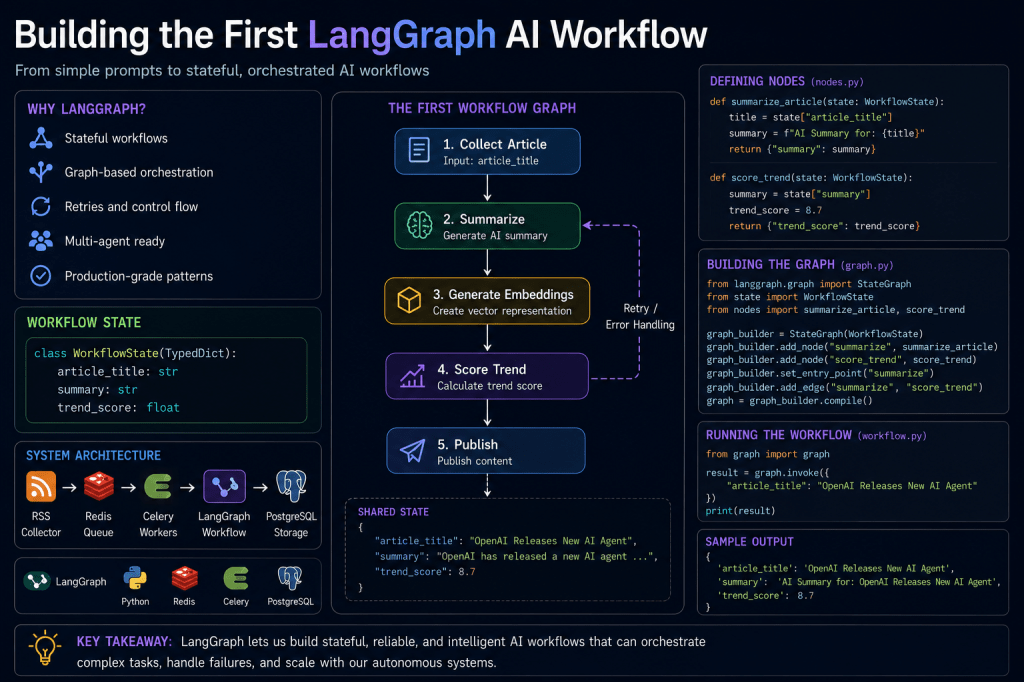
In this article, we will build the first real LangGraph workflow inside AgenticMediaLab.
What Is LangGraph?
LangGraph is a framework for building:
- stateful AI workflows
- autonomous agents
- graph-based orchestration systems
Instead of thinking in:
- linear chains
LangGraph models workflows as:
- nodes
- edges
- execution graphs
- state transitions
This becomes extremely useful for:
- autonomous AI systems
- retry logic
- branching workflows
- multi-agent coordination
Why LangGraph Matters
Most beginner AI workflows look like this:
Prompt ↓LLM ↓Response
But operational AI systems look more like this:
Collect Data ↓Validate ↓Summarize ↓Generate Embeddings ↓Analyze Trends ↓Publish
Each step has:
- execution state
- failure conditions
- retries
- branching decisions
LangGraph was designed for these types of systems.
Installing LangGraph
Install dependencies:
pip install langgraph langchain openai
Repository Structure
Create:
workflows/│├── langgraph/│ ├── workflow.py│ ├── nodes.py│ ├── state.py│ └── graph.py
This becomes the orchestration layer.
Understanding Workflow State
One of the most important LangGraph concepts is:
shared state
State flows through the workflow graph.
Example:
Article ↓Summary ↓Embeddings ↓Trend Score
Each node updates the workflow state.
Creating the Workflow State
Create:
workflows/langgraph/state.py
Example:
from typing import TypedDictclass WorkflowState(TypedDict): article_title: str summary: str trend_score: float
This defines the workflow memory structure.
Why Typed State Matters
State schemas improve:
- reliability
- predictability
- debugging
- orchestration clarity
Without structured state:
- workflows become chaotic
- node communication becomes inconsistent
State management becomes critical in autonomous systems.
Creating the First Workflow Node
Create:
workflows/langgraph/nodes.py
Example:
def summarize_article(state): title = state["article_title"] summary = f"AI Summary for: {title}" return { "summary": summary }
This becomes the first workflow step.
What Is a Node?
A LangGraph node is simply:
- a unit of execution
Each node:
- receives state
- processes data
- returns updated state
Operational AI systems become collections of orchestrated nodes.
Building the Graph
Create:
workflows/langgraph/graph.py
Example:
from langgraph.graph import StateGraphfrom state import WorkflowStatefrom nodes import summarize_articlegraph_builder = StateGraph( WorkflowState)graph_builder.add_node( "summarize", summarize_article)graph_builder.set_entry_point( "summarize")graph = graph_builder.compile()
This creates the first executable workflow graph.
Running the Workflow
Create:
workflows/langgraph/workflow.py
Example:
from graph import graphresult = graph.invoke({ "article_title": "OpenAI Releases New AI Agent"})print(result)
Run:
python workflows/langgraph/workflow.py
Example output:
{ "article_title": "OpenAI Releases New AI Agent", "summary": "AI Summary for: OpenAI Releases New AI Agent"}
The first LangGraph workflow is now operational.
What Just Happened?
Instead of:
- isolated execution
we now have:
- structured orchestration
- shared workflow state
- node coordination
This is a major architectural transition.
Adding a Second Node
Real workflows contain multiple steps.
Add:
def score_trend(state): summary = state["summary"] trend_score = 8.5 return { "trend_score": trend_score }
Updating the Graph
Add the second node:
graph_builder.add_node( "score_trend", score_trend)
Connect nodes:
graph_builder.add_edge( "summarize", "score_trend")
The workflow now becomes:
Summarize ↓Trend Score
This is graph orchestration.
Why Graph-Based Workflows Matter
Linear pipelines break down quickly.
Real systems require:
- branching
- retries
- loops
- conditional execution
- human approval
- failure recovery
Graphs model these behaviors naturally.
Example Future Workflow
Eventually the system may look like:
Collect RSS ↓Deduplicate ↓Summarize ↓Generate Embeddings ↓Cluster Topics ↓Detect Trends ↓Generate Posts ↓Publish
Every step becomes:
- observable
- retryable
- stateful
LangGraph vs Simple Scripts
Simple scripts:
Run ↓Complete
LangGraph workflows:
State ↓Nodes ↓Edges ↓Branching ↓Retries ↓Execution Control
The orchestration complexity increases dramatically.
Why This Changes AI Engineering
This is where AI systems begin resembling:
- distributed systems
- workflow engines
- operational infrastructure
rather than:
- chatbots
- prompt wrappers
This shift is extremely important.
Integrating Celery and LangGraph
Soon the architecture will combine:
Celery ↓Async Execution ↓LangGraph ↓Workflow Orchestration
This creates:
- distributed AI workflows
- scalable orchestration
- autonomous execution
The system is becoming operational infrastructure.
Adding Real LLM Calls
The current summary node is static.
Soon it will evolve into:
response = llm.invoke(prompt)
This transforms:
- workflow orchestration
into:
- operational AI reasoning systems
Why LangGraph Is So Interesting
LangGraph sits at the intersection of:
- AI
- orchestration
- infrastructure
- workflow engineering
It enables developers to think about AI systems as:
- operational graphs
- autonomous workflows
- stateful execution systems
This is far beyond simple prompting.
Common Beginner Mistake
Many developers initially build:
Prompt ↓Response
But production AI systems increasingly require:
State ↓Workflow ↓Retries ↓Queues ↓Observability ↓Autonomous Coordination
This is a completely different engineering discipline.
What Comes Next
The next steps for AgenticMediaLab include:
- OpenAI integration
- embeddings
- workflow branching
- conditional routing
- retries
- observability
- multi-agent workflows
The system is gradually evolving into:
- a real autonomous AI platform.
Final Thoughts
Building the first LangGraph workflow marks a major milestone for AgenticMediaLab.
The platform is now moving beyond:
- scripts
- isolated APIs
- sequential execution
and into:
- orchestration
- workflow engineering
- autonomous systems
- operational AI infrastructure
This is where modern AI engineering becomes truly interesting.
And this is only the beginning.
 Agentic Media Lab