While setting up the infrastructure for AgenticMediaLab, I ran into my first real Docker Compose debugging session.
The goal sounded simple:
- create a
docker-compose.yml - start PostgreSQL
- start Redis
- bring up the infrastructure stack
But like many software engineering tasks, reality became slightly more complicated.
This experience turned into a useful reminder that infrastructure engineering often involves:
- configuration debugging
- environment troubleshooting
- tooling mismatches
- version compatibility issues
and not just writing code.
The First Error
When running:
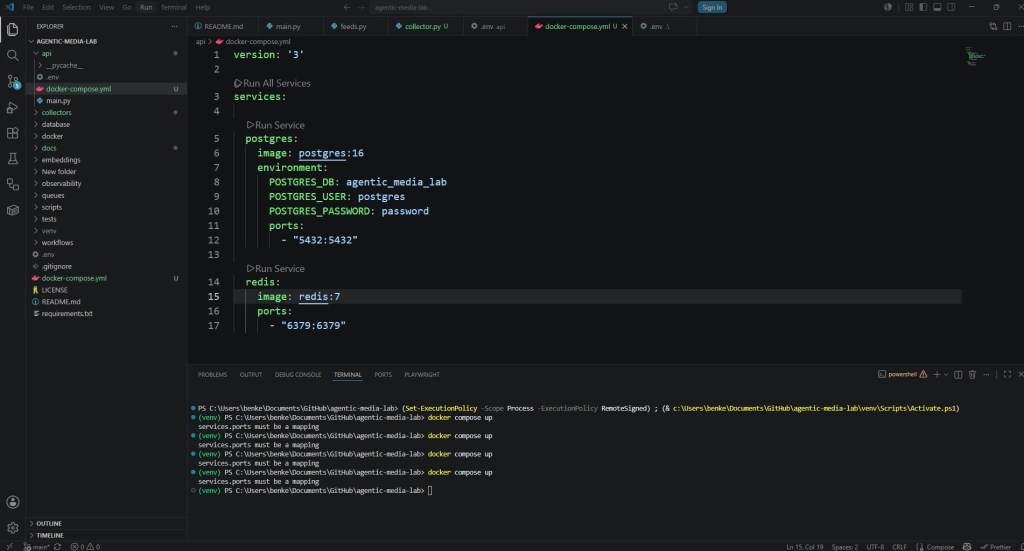
docker compose up
Docker immediately returned the following error:
services.ports must be a mapping
At first glance, the error was confusing.
The ports section visually looked correct.
But Docker Compose YAML files are extremely sensitive to:
- indentation
- spacing
- formatting
- hidden characters
- invalid YAML structures
Rebuilding the docker-compose.yml File
After trying to inspect the file manually, I eventually rebuilt the entire docker-compose.yml configuration file from scratch.
Once rebuilt, the error disappeared.
My assumption is that:
- an invalid hidden character
- formatting corruption
- or malformed YAML spacing
was causing the parser to fail.
This is one of those infrastructure problems where:
- the file visually looks correct
- but internally something is malformed
YAML can be unforgiving in these situations.
A Good Reminder About YAML
One thing I quickly learned:
YAML is whitespace-sensitive.
Small formatting issues can completely break:
- Docker Compose
- Kubernetes manifests
- CI/CD pipelines
- infrastructure automation
Even:
- tabs instead of spaces
- invisible Unicode characters
- malformed indentation
can trigger confusing parser errors.
This is why many infrastructure engineers:
- rewrite files manually
- use minimal formatting
- avoid copy/paste from rich text sources
when debugging YAML problems.
The Second Docker Compose Issue
After fixing the YAML issue, Docker returned another message:
version is obsolete
Older Docker Compose examples often include:
version: '3'
But newer Docker Compose implementations no longer require this parameter.
In modern Docker Compose:
- the version field is deprecated
- Compose automatically detects the correct schema
Removing the version parameter resolved the warning.
Docker Recommended Updating Docker Desktop
After removing the obsolete version field, Docker Desktop displayed another recommendation:
- upgrade Docker Desktop to a newer version
This was actually useful advice.
Modern AI infrastructure stacks increasingly depend on:
- container orchestration
- Compose compatibility
- networking
- volume management
- newer Docker features
Running outdated Docker versions can create:
- compatibility problems
- parser inconsistencies
- missing features
- infrastructure instability
Upgrading Docker Desktop is strongly recommended for modern development workflows.
Finally Running docker compose up Successfully
Once the YAML issue and version issue were resolved, running:
docker compose up
finally worked correctly.
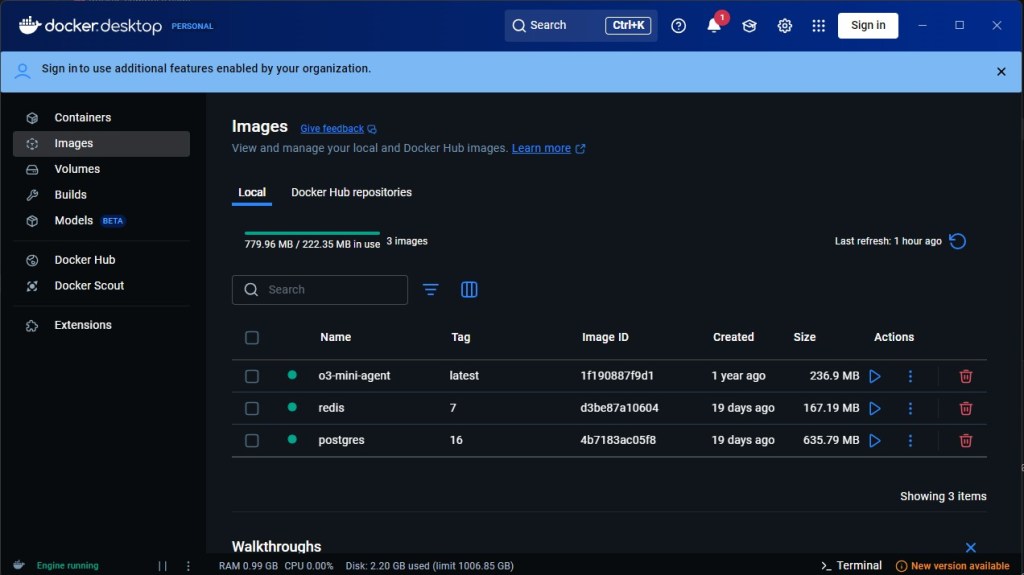
Docker automatically began downloading:
- PostgreSQL
- Redis
images directly from Docker Hub.
The console displayed download progress for both containers.
Seeing the Containers Appear in Docker Desktop
One interesting moment was seeing the containers appear visually inside Docker Desktop.
This made the infrastructure feel “real.”
Suddenly:
- PostgreSQL was running
- Redis was running
- containers were active
- services were visible
The project was no longer:
- just Python files
It had become:
- operational infrastructure
This is an important transition point in software engineering.
Infrastructure Engineering Feels Different
Building infrastructure feels different from writing application code.
You begin dealing with:
- services
- containers
- networking
- ports
- orchestration
- environment configuration
instead of:
- functions
- loops
- variables
The mental model changes.
You move closer to:
- systems engineering
- platform engineering
- operational architecture
Why These Problems Are Valuable
Although the experience was frustrating initially, these problems are valuable learning experiences.
You start understanding:
- how Docker Compose works
- how YAML parsing behaves
- how infrastructure layers interact
- how containerized services operate
Every debugging session improves:
- operational intuition
- engineering confidence
- infrastructure understanding
One Important Lesson
One thing this experience reinforced:
Infrastructure issues are often configuration issues.
Not every failure means:
- broken software
- bad code
- failed frameworks
Sometimes:
- formatting
- version mismatches
- environment inconsistencies
- tooling differences
are the real source of the problem.
Modern software engineering increasingly involves debugging systems around the code itself.
What Happens Next
With PostgreSQL and Redis now running successfully, the AgenticMediaLab infrastructure stack officially began taking shape.
The next steps include:
- RSS ingestion
- queue systems
- LangGraph workflows
- observability
- token tracking
- autonomous orchestration
This was the first real infrastructure milestone of the project.
Final Thoughts
This Docker Compose troubleshooting session became a reminder that software engineering is not only about writing application logic.
It is also about:
- infrastructure
- tooling
- environments
- orchestration
- debugging operational systems
The errors:
- “services.ports must be a mapping”
- obsolete Compose version warnings
- Docker Desktop upgrade recommendations
were all part of the learning process.
And once the containers finally appeared inside Docker Desktop, the project suddenly felt much more like a real autonomous AI system than just another Python experiment.
👉 You can experiment with a practical AI News System implementation of this concept in the official GitHub repository for the AgenticMediaLab: https://github.com/BenardoKemp/agentic-media-lab
 Agentic Media Lab